9.1 Provide a clear status of your Internal and External Technical and Organisational Measures implementation status
To access to the status of your Internal and External Technical and Organisational Measures implementation, please access the TPOmap Dashboard as explained in Part 10.
Now, the metrics that are important for the Module 2 – Internal and External Measures are the following:
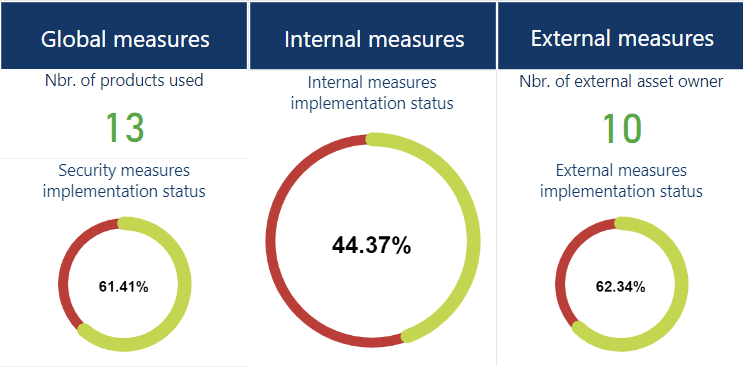
These metrics show important counters:
- Nbr. of products used
This counter shows the number of different IT Products that is used regarding the completion of the Chapter 4 of Processing sheets.
Please refer to Part. 7.2.2.2.4 – Chapter 4 – Assets of this User Guide for more information about how to complete Chapter 4 – Assets of a Processing sheet.
- Security measures implementation status
This counter will display the global percentage of implemented technical and organisational measures regarding the implementation status of internal and external measures; the technical and organisational measures that have been identified as “not appropriate” are not taken into account.
- Internal measures implementation status
This counter will display the global percentage of implemented internal technical and organisational measures indicated in the Technical Sheets of your Processing entity.
Implementing technical and organisational measures for a Processing entity and then filling up the Implementation Status cell in the Technical Sheet(s) of the corresponding Processing entity(ies) will raise this counter towards 100%.
- Nbr. of external products used
This counter will display the total number of IT Products (as entered in the Processing sheets) which are under the responsibility of one or more external asset owners.
Recording products in the Processing sheets Chapter 4 – Assets will feed this counter.
Please refer to Part. 7.2.2.2.4 – Chapter 4 – Assets of this User Guide for more information about how to complete Chapter 4 – Assets of a Processing sheet.
- External measures implementation status
This counter will display the global percentage of implemented external technical and organisational measures as indicated in the Technical sheets for each external asset owner.
Implementing the external technical and organisational measures by contractually requesting their implementation from the relevant external asset owner(s) and then filling up the Implementation Status cell in the corresponding Technical Sheet(s) will raise this counter towards 100%.
As a standard, these counters take count of ALL Processing sheets.
It is however possible, thanks to the “Scope” menu of the Dashboard, to take only count of:
- The Processing activities of a specific processing entity
- The Processing activities that is validated or not
- The Assets pertaining to one or more selected Processing sheets
- The Assets pertaining to a specific area of activities of your organization
- The Assets pertaining to processing activities that present a high level of risk
- The Assets regarding the Processing activities of a specific data subjets
- The Processing activities that a have a specific status
For more information on how to use the “Scope” menu, please refer to Part 10.