6.2 Description of folders’ content and related access rights
Each authorized user will only be able to see the folders corresponding to his/her role:
- Full User (“Data Protection Officer/ Data Protection Manager”)
- Restricted User – Data Business Owner
- Restricted User – IT
Please find hereafter a description of the different folders and the user roles that are authorized to access them:
01 – GDPR Policies & Templates:
This folder will be used to store the different versions of the Policies & Templates created regarding the GDPR.
- 01 – Policies & Governance
This folder will be used to store agreed upon data protection policies and governance (e.g. data retention policy; data management policy; security policy; breach management policy; …).
Full Users and Restricted User (Data Business Owner or IT) can all read and contribute to this folder.
- 02 – Templates
This folder will be used to store the templates of the different GDPR related documents (e.g.: data processing agreement template; joint data controller agreement template; privacy notice; …).
Full Users and Restricted User (Data Business Owner or IT) can all read and contribute to this folder.
- 03 – Training
This folder will be used to store training materials given to employees regarding the GDPR.
Full Users and Restricted User (Data Business Owner or IT) can all read and contribute to this folder.
02- DPO Documentation
This folder will be used to store documents whose relevance is limited to users with a Data Protection Officer/ Data Protection Manager role (Full User) (ex. GDPR compliance annual reports).
Only the Full Users can read and contribute to this folder.
- 01 – Annual report
This folder will be used to store reports outlining the action items identified for the DPO for the coming year.
- 02 – DPO designation
This folder will be used to store the DPO’s mission letter.
03 – Compliance Evidence
This folder will be used to store DPIAs, data processing agreement, privacy notices, legal bases of processing, clauses …
Only the Full Users can read and contribute to this folder.
- 01 – To Do’s List
This folder is designed to be used to store the list of all the tasks to be done.
- 02 – DPIA’s
This folder is designed to be used to store all the DPIA (Data Protection Impact Assement) performed.
- 03 – Legal bases of processing
This folder is designed to be used to store all the legal bases used for the processing (e.g.: a contract; a law; a consent form ;…).
- 04 – Legal bases of Transfer
This folder is designed to be used to store all the legal bases used for transfers data to a recipient (e.g.: a contract; a law; a legitimate interest assessment ; …)
- 05 – DPA’s
This folder is designed to be used to store all signed data processing agreement.
- 06 – Joint Controller Arrangement
This folder is designed to be used to store all signed joint controller agreement.
- 07 – Privacy Notices
This folder is designed to be used to store all the privacy notices drafted.
- 08 – TIA’s
This folder is designed to be used to store all the transfers impact assessments of transfers outside the EEA performed.
- 09 – LIA’s
This folder is designed to be used to store all the legitimate interest assessment performed.
- 10 – Data Subject Rights
This folder is designed to be used to store all the request received from a data subject regarding his rights and the answer provided to him.
The different roles and their access rights can be summarized as follows:
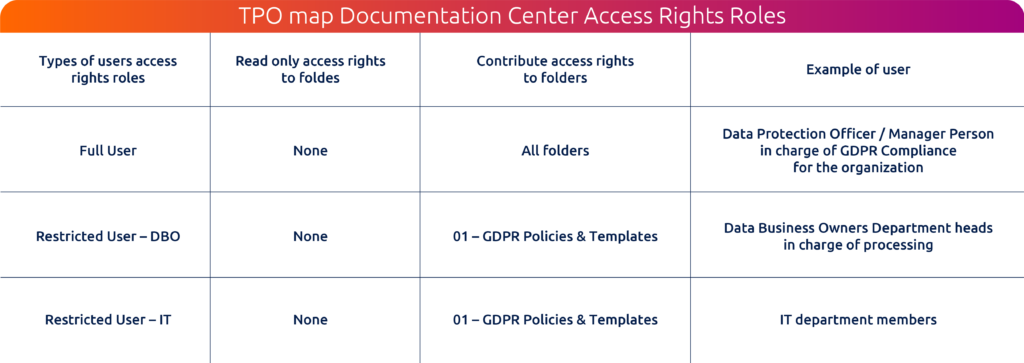
- Read only access rights means the authorised users will be able to:
- Read folder and files content
- Download folder and files to their devices
- Create sharing links to folder and files
- Contribute access right means the authorised users will be able to:
- Read folder and files content
- Create new folders and files
- Moving and copying existing files and folders
- Edit existing files content
- Rename existing folders and files,
- Upload folders and files from an external source
- Download folder and files to their devices
- Create sharing links to folder and files
- Rename existing folders and files,
- Delete existing folders and files (functionality to be used with care)
TPO will take no responsibility for downloaded files. It is up to the authorized user to check prior to the download whether he/she is authorized to do so and to ensure the proper security and confidentiality of the downloaded files after the download.