8.2 Open, complete and edit technical and organisational measures sheets
Every technical and organisational measures sheet can be opened, completed and edited by the same methods.
To complete the Technical and Organisational Measures Sheet of your own entity, it is recommended to gather the relevant information by involving the members of the IT department of the concerned processing entity or any other person with detailed knowledge of the products and their associated supporting assets used by that processing entity as well as the persons responsible for the IT security policies in place for that processing entity.
To complete a Technical and Organisational Measures Sheet of an external asset owner, it is recommended to gather the relevant information by examining the Controller Processor Agreements type of contract already in place with that particular asset owner, especially the description of security measures which should be provided in such contract.
If no detailed description of the security measures is provided in such contract or in the terms and conditions of use of the product, it is recommended to contact the data processor directly to obtain more information.
If such contract is not yet in place, it is recommended to contact the DPO of that processing entity or members of the Privacy Team belonging to the legal department for advice on how to implement one.
8.2.1. OPENING TECHNICAL AND ORGANISATIONAL MEASURES SHEETS
In order to complete a new or modify an existing Technical and Organisational Measures Sheet, please follow the next steps:
- Select the Asset Owner for whom you wish to complete the technical and organisational measures from the drop down list

- Select the category of security measures you want to go through
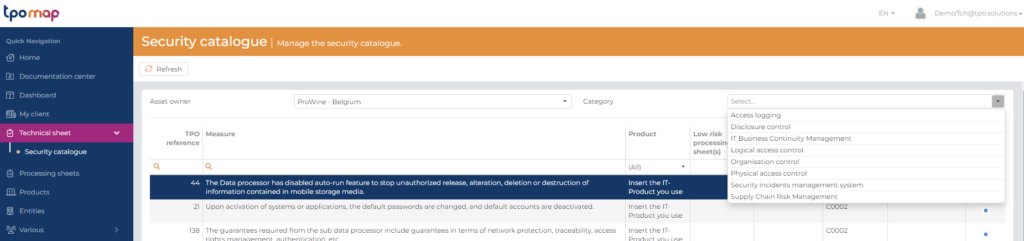
You are now able to completed the Technical and Organisational Measures Sheet for the asset owner selected and an specific category of measures chosen.
8.2.2 COMPLETING AND EDITING TECHNICAL AND ORGANISATIONAL MEASURES SHEETS
Once a Technical and Organisational Measures Sheet has been opened, you have to double click on a specific measure to fill-in the following information for each applicable measure :
- Implementation status
- Security policy
- Contract references
- Justification
- Comments
The others information are automatically fill-in regarding to the reference measures chosen and the IT products related to the sheet.

Please read the following sections for guidance on how to complete the specific cell.
8.2.2.1 Implementation status
The purpose of this cell is to identify the status of the implementation of the measures listed.
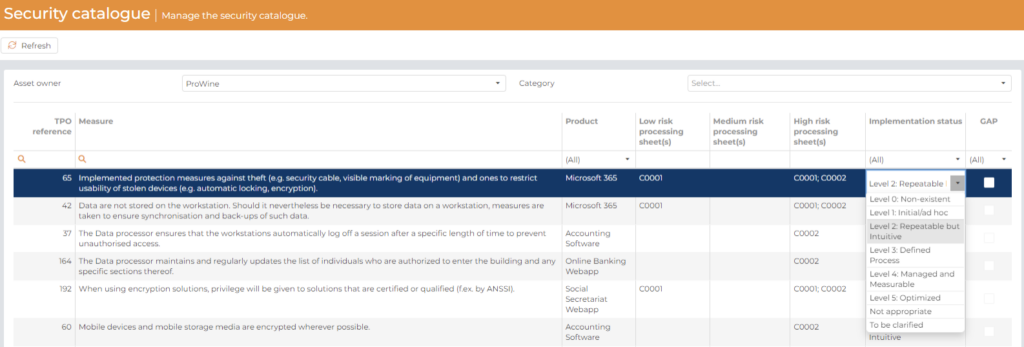
Please select the current implementation status of a measure from the dropdown list:
- When this particular measure is deemed not appropriate for that particular asset owner, please select:
- Not Appropriate
Example: Measures concerning the protection of fax devices are not appropriate if no fax devices are used by a processing entity or by an external asset owner.
- When the implementation status of the measure is currently not clearly defined, please select:
- To be clarified
Example: This measure is appropriate, but more research or documentation is needed to clearly define which is the current implementation status of the measure.
- When an implementation status can be defined, please rate it according to one of the levels of the COBIT 4.1 Maturity model:
- Level 0: Non-existent
Example: An internal control is not required for the company based on
culture or internal mission. The related risks and deficiencies are considered to be very high.
- Level 1: Initial/ad hoc
Example: An internal control is considered necessary. However, this internal control is ad hoc and not organised. The employees are not aware of their responsibilities. Deficiencies are not identified.
- Level 2: Repeatable but Intuitive
Example: Controls are implemented but not documented, since they depend on the knowledge and motivation of individuals. The employees may not be aware of their responsibilities.
- Level 3: Defined Process
Example: As at the previous level the controls are implemented, but in this
level an adequate documentation exists. Unlike level 2, the employees are aware of their responsibilities for control.
- Level 4: Managed and Measurable
Example: The risk management and the implementation of internal controls are effective. The evaluation of internal controls is formally documented based on periodic reviews. However also with these efforts, not all the issues are identified.
- Level 5: Optimized
Example: Risks and controls are managed by a good program that provides continuous and effective control and risk issues resolution. The enterprise practices encompass internal control and risk management. Unlike at the other levels, the employees are pro-actively involved in controlling the improvements produced.
For a measure to be considered sufficiently implemented and avoiding a security gap, a COBIT 4.1 Level of 1 or above is required.
8.2.2.2 Justification
The purpose of this cell is to identify the justification of the choice made into the implementation status.
Please enter a justification for your implementation status choice (free text).
Example: reference to a document, internal policy, security measure mentioned in a controller processor agreement type of contract, interview of IT department staff member…
The “security policy” cell only needed to be completed for an Technical & Organisational Sheet of a processing entity and the “contract references” cell only needed to be completed for an Technical & Organisational Sheet of a external asset owners.
Please select an existing internal security policy or contract references from the dropdown list to link a particular measure with that policy/contract.
It will help keeping track of which measure from the list is covered by which internal policy or contract.
8.2.2.4 Comments
Please enter any other pertinent information and comment regarding the implementation of a particular measure.