7.1 Create new Processing sheets
7.1.1 CREATE NEW PROCESSING SHEETS
In order to create a new processing sheet, please access the “+ New“ Tab.
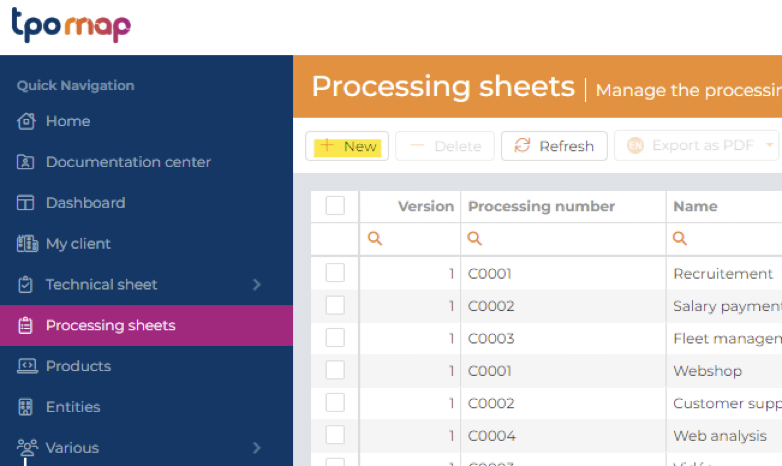
Then, you have to encode:
- The name of the processing
- The entity for which you create the processing
- The legal qualification of your entity regarding this processing:
- If the processing is performed by your processing entity as Controller (as defined in art. 4 (7) GDPR). In such case, the Processing sheet must be part of the Record your processing entity needs to keep in its quality of “Controller”, meaning that the “Record owner” is a Controller. Therefore, please choose “Data controller” on the dropdown list, or
- If the processing is performed by your processing entity as Processor (as defined in art. 4 (8) GDPR). In such case, the Processing sheet must be part of the Record your processing entity needs to keep in its quality of “Processor”, meaning that the “Record owner” is a Processor. Therefore, please choose “Data processor”) on the dropdown list, or
- If the processing is performed by your processing entity as Data controller representative (as defined in art. 4 (17) GDPR). In such case, the Processing sheet must be part of the Record your processing entity needs to keep in its quality of “Data controller representative”, meaning that the “Record owner” is a Data controller representative. Therefore, please choose “Data controller representative” on the dropdown list, or
- If the processing is performed by your processing entity as Data processor representative (as defined in art. 4 (17) GDPR). In such case, the Processing sheet must be part of the Record your processing entity needs to keep in its quality of “Data processor representative”, meaning that the “Record owner” is a Data processor representative. Therefore, please choose “Data processor representative” on the dropdown list.
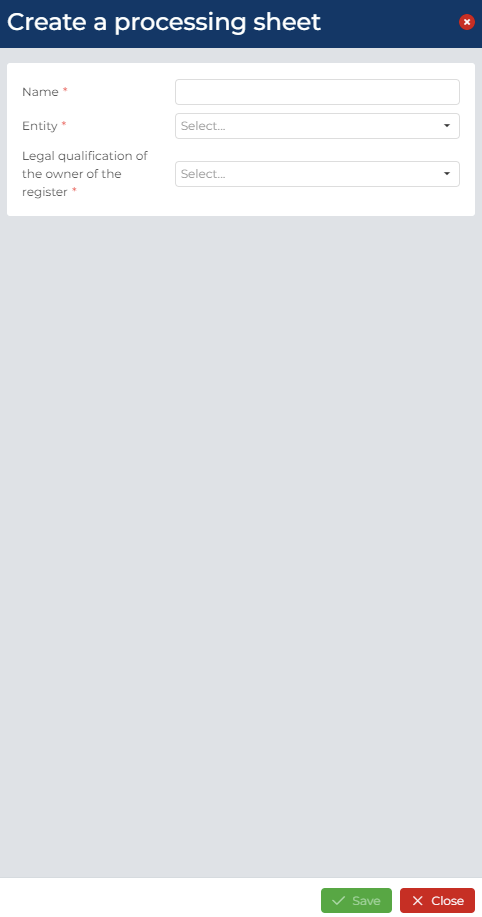
Any processing sheet created can be edited.
7.1.2 SUGGESTED NAMING CONVENTION FOR PROCESSING SHEETS
In order to manage a large number of processing sheets, we recommend that once created, Processing sheets shall be named in a structured way as follow:
Processing number:
The processing number is automatically proposed by the TPOmap Application by adding +1 on the basis of the previous processing sheets.
The processing number is always precede by the abbreviation of the legal qualification of the record owner:
- C for processing activities where your Processing entity is a data controller
- P for processing activities where your Processing entity is a data processor
Processing name:
Please use a short and descriptive name for the processing
Please avoid using any special characters and punctuations signs in file names (- / ? * .= # …)
Example of processing sheets names:
C0001 Newsletter
C0002 Salary administration
C0003 Employees management
P0001 Helpdesk ticketing system
P0002 Internal usage monitoring