7.2 Open, complete and edit processing sheets
7.2.1 OPENING PROCESSING SHEETS
In order to complete a new or modify an existing processing sheet, please access the “+ New“ Tab as explain in Part 7.1.1.
To open a existing processing sheet, you just have to double click on it to open it.
Any processing sheet can be edited.
7.2.2 COMPLETING PROCESSING SHEETS
7.2.2.1 PROCESSING SHEETS STRUCTURE
Each processing sheet is composed of the following chapters:
7.2.2.1.1 CHAPTER 1-10: RECORD OF PROCESSING
These chapters are used to document the processing related information that is:
- required to ensure compliance with art. 30 GDPR or
- useful for other GDPR compliance related purposes.
7.2.2.1.2 CHAPTER 11: RISK ANALYSIS
This chapter is used to ensure and document compliance with art. 35 GDPR by:
- Documenting whether a personal data processing activity “is likely to result in a high risk to the rights and freedoms of natural persons” by selecting whether the official criteria of the relevant data protection authorities are met or not.
- Assessing whether a Data Protection Impact Assessment (DPIA) prior to this processing is thus “normally required”, “normally not required” or “not legally required”. Such assessment will be automatically calculated on the basis of the criteria selected.
- Logging, whether a DPIA has been performed by selecting yes or no next to the tab “DPIA has been made”.
- Documenting any related comments or link to related documents (which should ideally be stored in the TPO MAP Documentation Depository).
7.2.2.1.3 CHAPTER 12: MOST APPROPRIATE LEGAL GROUNDS
This chapter is used to ensure and document compliance with the principle of “lawfulness” (art. 5, 1., (a) GDPR) as well as with article 6 and/or 9 GDPR by:
- Documenting the most appropriate Legal Grounds that have been identified for each data processed ;
- Recording the implementation status of such legal ground (implemented, non-applicable, not implemented, ongoing) ;
- Documenting any related comments or link to related documents (which should ideally be stored in the TPO MAP Documentation Depository).
7.2.2.1.4 CHAPTER 13: APPLICABLE DATA SUBJECTS RIGHTS
As part of Module 4, this chapter is used to ensure and document compliance with the transparency principle enshrined in art. 5, 1., (a) GDPR and the information obligations of articles 12-14 GDPR by:
- Documenting whether the right to transparent communication and information needs of employees and/or other data subjects needs to be taken care of for this processing
- If so, document whether an information notice has been drafted, is not necessary or still needs to be drafted.
7.2.2.2 COMPLETE A PROCESSING SHEET
To ensure the completeness and exactitude of the information recorded in all processing sheet chapters, automated checks exist which are displayed in red.
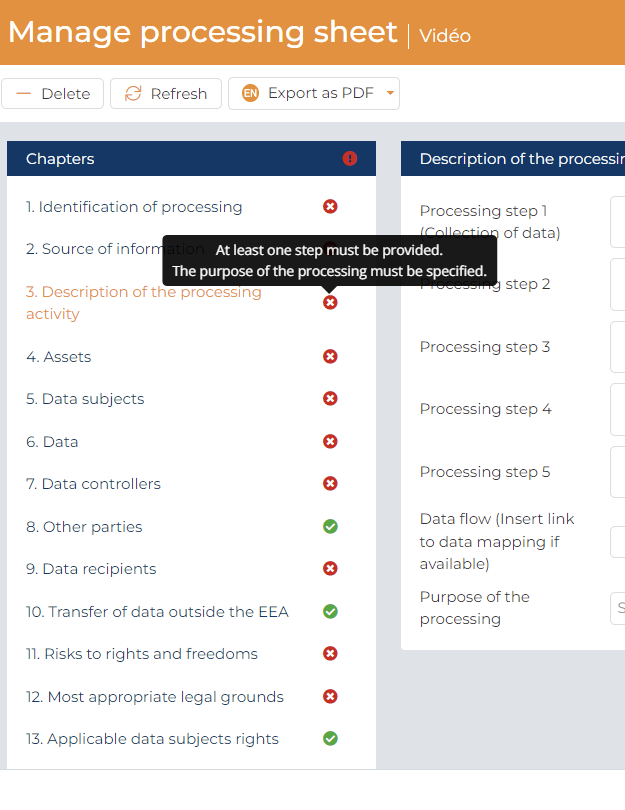
They will automatically turn green once the required information has been completed. To know the information missing, you just have to put your computer mouse on the red cross.
Information can be entered in one of the following ways depending on the cell:
- Free text
- Choosing from a dropdown list
- Tick a box
Please, be aware that this “answer”

on a tick box means that you don’t have provide an answer to the question.
- Comment
Please read the following sections for guidance on how to complete the specific chapters. As mentioned in Part 2.8. of this User Guide, TPO recommends that the responsibility for documenting personal data processing activities is assigned to the Data Business Owners.
7.2.2.2.1 CHAPTER 1 – IDENTIFICATION OF PROCESSING
The purpose of this chapter is to identify:
- The personal data processing activity that is going to be documented in the Processing sheet and
- The Data Business Owner (department) responsible for ensuring that this activity is properly documented.
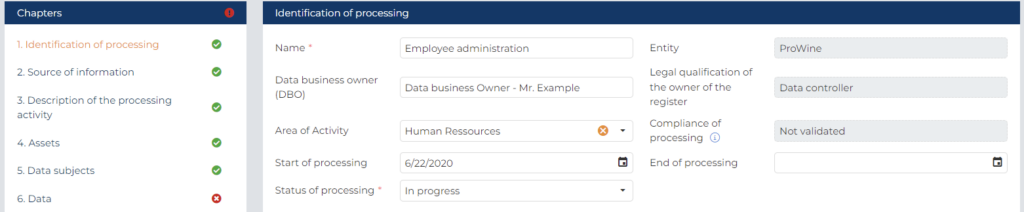
Please enter the following information:
- Enter a Processing name (cfr. Section 7.1.2. for TPO’s suggested naming convention for Processing sheets)
- The Legal entity name is automatically completed on the basis of the choice made during the creation of the processing sheets.
- Please enter the Data Business Owner of this processing. For a description of the Data Business Owner role in the Governance of a PMP pursuant to TPO’s methodology, see Part 2.
We recommend entering a department name rather than a specific person name
- The Legal qualification of the owner of the register is automatically completed on the basis of the choice made during the creation of the processing sheets.
- Select the Areas of activities from the dropdown list
The dropdown list has been pre-configured for your organisation on the basis of the information provided during the Set-up of TPO MAP. Please select the area of activities of the Data business owner.
- Please select in the “Compliance of processing”, “Validated” only if your DPO have reviewed your processing sheets and agree with its content.
- Please enter the current Status of the processing activity. If the processing activity is ongoing, choose “In progress”. If the processing activity hasn’t started yet, choose “Project”. If the processing activity has been stopped, choose “Finished”.
- Please enter the Start date of the treatment.
- If a processing activity is still ongoing but is going to be terminated at a given moment, please choose “In progress” and enter the likely Termination Date.
7.2.2.2.2 CHAPTER 2 – SOURCE OF INFORMATION
The purpose of this chapter is to ensure the traceability of the information documented in the Processing sheet by keeping track of the source of information used to complete it.

Processing sheets are either completed by the Data Business Owner or by another person (DPO, consultant, other staff members) on his/her behalf. In the latter case, the Processing sheet will be documented on the basis of interviews of knowledgeable staff members.
If you are filling this processing sheet by yourself, please tick the tab “The source of information is the data business owner”.
Please enter the following information:
- Please enter the Interview date.
Equivalent of the date when you are completing this Processing sheet by yourself.
- Please enter the name of Department interviewed.
Enter your own department name if youare filling this processing sheet by yourself
- Please enter the name(s) of the Person(s) interviewed.
Enter your own name if youare filling this processing sheet by yourself. If the organizational role of the interviewed person (ex. HR manager) is sufficiently precise for traceability purposes, indicate the role of the interviewed person rather than his/her name.
- Please enter the name(s) of the Interviewer(s).
Enter your own name if you are filling this processing sheet by yourself. If your organizational role (ex. IT manager, DPO) is sufficiently precise for traceability purposes, indicate the role instead of the name.
7.2.2.2.3 CHAPTER 3 – DESCRIPTION OF PROCESSING
The purpose of this chapter is to describe the processing activity in such a way that its scope and the processing steps involved become clear for an external reader such as the DPO or a Data Protection Authority, linking it to its operational context (from the start to the end).
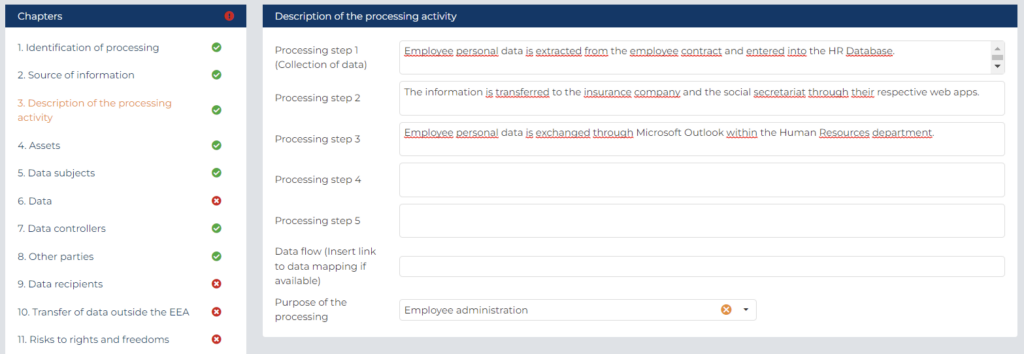
Please enter the following information:
- Please enter a Summary description of the processing (step 1 to 5).
Divide it in up to five steps for more complex processings.
- Please describe the Data flowfor this processing.
Enter a link to an existing data flow of this processing if available.
- Please select the Purposeof this processing.
Only one purpose can be selected for a processing.
7.2.2.2.4 CHAPTER 4 – ASSETS
The purpose of this chapter is to identify the Paper and IT assets supporting the processing of personal data.
TPO’s experience has shown that a proper mapping of the situation is a major cornerstone of a meaningful Privacy Management Program for the following reasons:
- It will be a prerequisite for compliance with art. 32 GDPR requiring the implementation of technical and organisational security measures that take into account the “context” of processing. The categories of security measures to be deployed depend indeed:
- on the types of assets involved (ex. security measures deployed on a server will be different from the security measures deployed on a mobile device). Such assets are different from one IT product to the other.
- on the asset “owner”, i.e. the organization responsible for “implementing“ such measures:
- if an application is deployed on an organization’s own IT infrastructure such infrastructure will need to be protected by the organization’s own policies and measures. In such case, the asset owner will qualify as “internal” for the purpose of completing Part 4,
- If an application is deployed on the infrastructure of an external party, the organization will need to rely on such external party to implement the necessary security measures. This will be very often the case when an organization relies on external IT services (ex. hosting provider, external IT provider responsible for the administration portal, provider of SaaS services). In such case, the asset owner will qualify as “external” for the purpose of completing Part 4.
- It will be a prerequisite for compliance with respectively art. 28 GDPR – requiring the implementation of specific agreements with organisations processing personal data on behalf of a controller as “processor” – and art. 26 GDPR – requiring the implementation of specific agreements with organizations qualifying as joint controllers, since many processors and joint controllers are involved in IT based services to the organization as “external asset owners”.
- It will be a prerequisite for compliance with art. 30 GDPR requiring to properly identify “categories of recipients to whom the personal data have been or will be disclosed including recipients in third countries or international organisations” since many data recipients are involved in IT based services to the organization. Such “data recipients” will be registered in chapter 9 (see below).
To add a new asset to your processing sheets, please select the “+ New” Tab first.
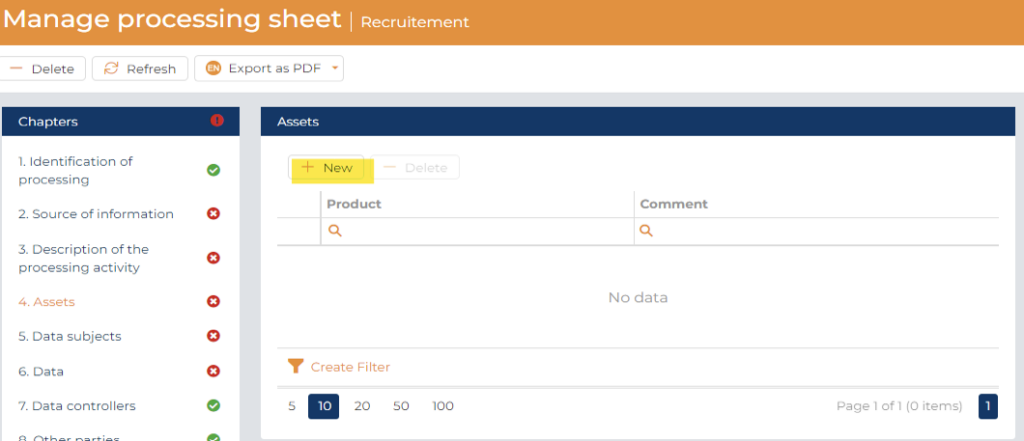
Please select the Products from the dropdown list.
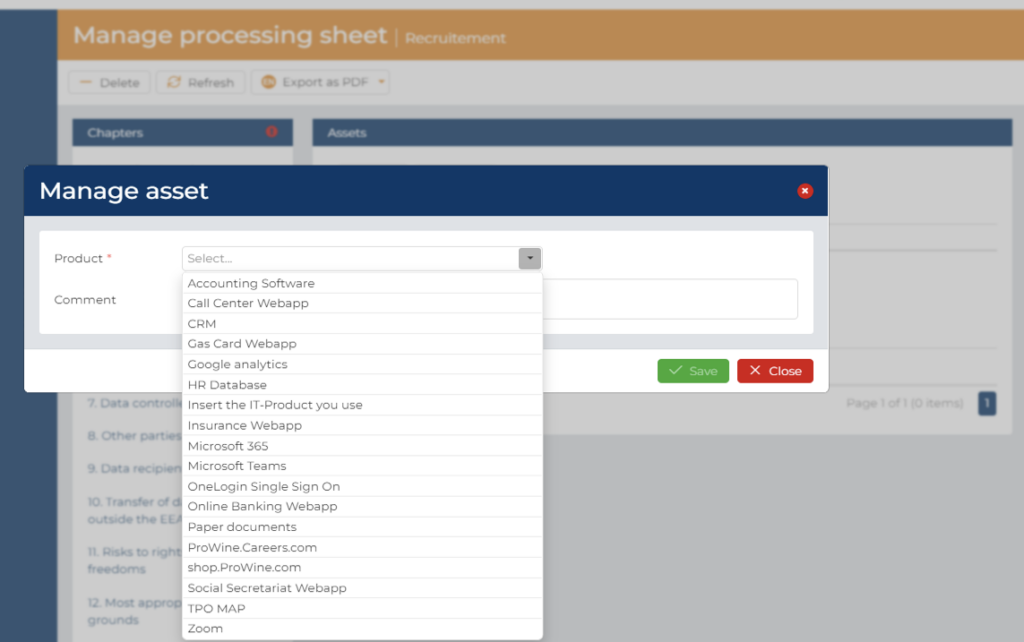
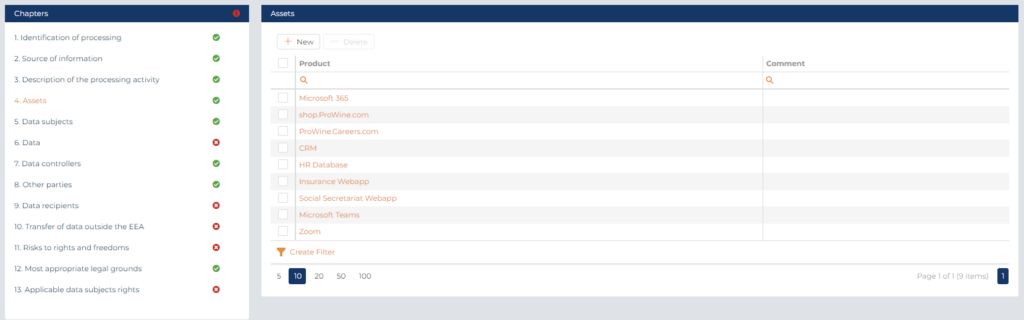
To facilitate the completion of this chapter by the Data Business Owner, the list of an organization’s IT Products has been identified as part of the TPO MAP Set-up.
As a result, each IT Product is automatically associated with an internal or external asset owner.
If this is not the case, this means that the information was not available at the moment of the set-up and will be integrated at a later stage as a result of the work performed by the DPO and the IT team.
7.2.2.2.5 CHAPTER 5 – Data subjects
The purpose of this chapter is to comply with art. 30 GDPR by recording a description of the categories of data subjects (as defined in art. 4 (1) GDPR, i.e. the “natural person that is identified or identifiable”) as part of the processing of personal data.
Since recital 75 GDPR has introduced the notion of “vulnerable data subjects”, requiring special protection, we have divided this Chapter into 2 sections:
- “ordinary” data subjects: referring to those data subjects that are not considered as “vulnerable”.
- “vulnerable data subjects”: as referred to in recital 75 GDPR and further defined by the Art. 29 Data Protection Working Party1. On this basis, “vulnerable data subjects may include children (they can be considered as not able to knowingly and thoughtfully oppose or consent to the processing of their data), employees, more vulnerable segments of the population requiring special protection (mentally ill persons, asylum seekers, or the elderly, patients, etc.), and in any case where an imbalance in the relationship between the position of the data subject and the controller can be identified”2.
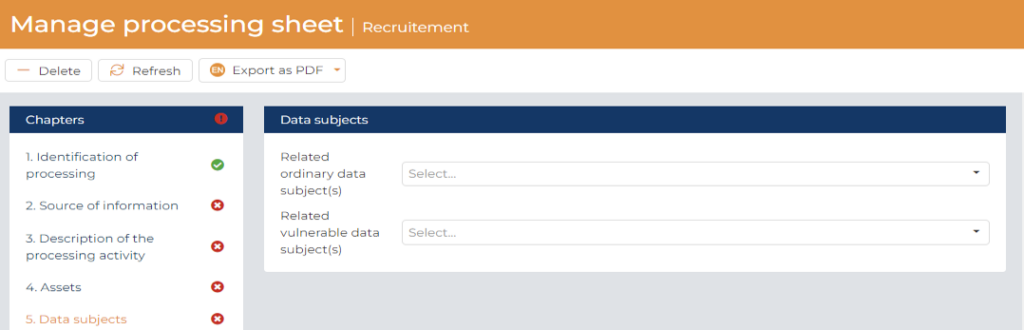
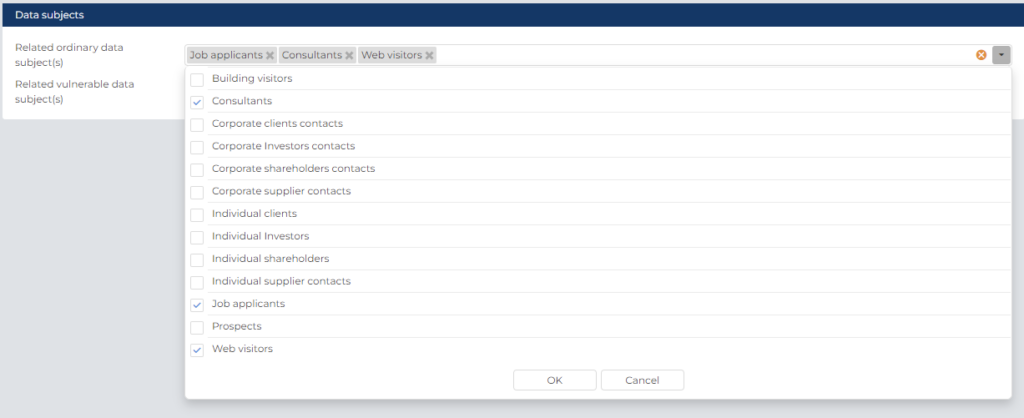
- Please select the categories of data subjects involved in the personal data processing activity from the lists of respectively ordinary and vulnerable data subjects by ticking them from the drop-down menu next to the selected category.
- If the category is not specifically listed, please add the category required as explain in Part 5 as part of the setup process.
1 Art. 29 Data Protection Working Party, WP 248 rev. 01, Guidelines on DPIA and determining whether processing is “likely to result in a high risk” for the purposes of Regulation 2016:679, as last revised on 4 October 2017, p. 10.
2 Art. 29 Data Protection Working Party, WP 248 rev. 01, Guidelines on DPIA and determining whether processing is “likely to result in a high risk” for the purposes of Regulation 2016:679, as last revised on 4 October 2017, p. 10.
7.2.2.2.6 CHAPTER 6 – DATA
The purpose of this chapter is to comply with art. 30 GDPR by recording a description of the categories of personal data (as defined in art. 4 (1) GDPR, i.e. “any information relating to an identified or identifiable natural person (‘data subject’)”) processed in the Processing sheet.
In order to be very precise, this chapter will not only allow you to record the type of data processed but also to link it to specific categories of data subjects.
Furthermore, since the Art. 29 Data Protection Working Party has introduced the notion of “sensitive data or data of a highly personal nature”, we have foreseen several sub-categories of personal data with an increasing level of sensitivity.
- Ordinary data : refers to personal data that do not qualify for any of the subsequent categories.
- Vulnerable data : as explained by the Art. 29 Data Protection Working Party3, beyond the “special” categories of personal data defined by art. 9 GDPR, certain personal data are considered as “sensitive (as this term is commonly understood) because they are linked to household and private activities (such as electronic communications whose confidentiality should be protected), or because they impact the exercise of a fundamental right (such as location data whose collection questions the freedom of movement) or because their violation clearly involves serious impacts in the data subject’s daily life (such as financial data that might be used for payment fraud). […]. This category may also include “data such as personal documents, emails, diaries, notes from e-readers equipped with note-taking features, and very personal information contained in life-logging applications”.
In addition to the categories expressly mentioned by the Art. 29 Data Protection Working Party, we have included categories of personal data that might raise data protection concerns for other reasons (ex. image recording, confidential data, national identification number, profiles) in order to attract the DPO’s attention.
- Special categories of personal data : refers to special categories of personal data as defined in Article 9 (for example information about individuals’ political opinions or a general hospital keeping patients’ medical records)
- Data relating to litigation : refers essentially to personal data relating to criminal convictions or offences as defined in Article 10 (i.e. a private investigator keeping offenders’ details).
To facilitate the comparison between personal data processed by a cookies (i.e. via a website or web application) or by other means, we have split this chapter into 2 sections.
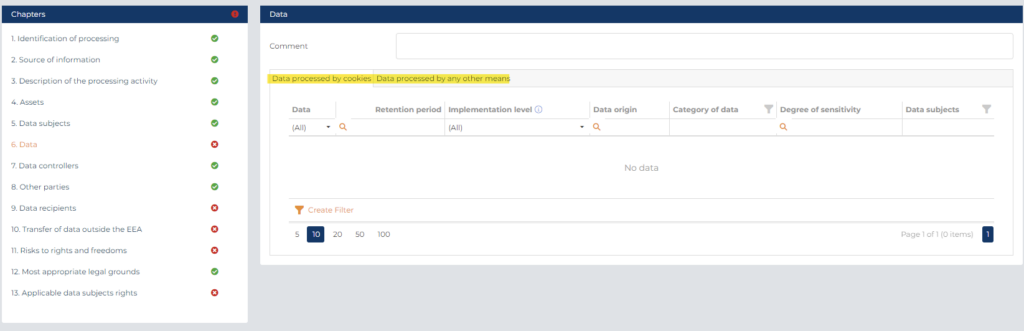
3 Art. 29 Data Protection Working Party, WP 248 rev. 01, Guidelines on DPIA and determining whether processing is “likely to result in a high risk” for the purposes of Regulation 2016:679, as last revised on 4 October 2017, p. 9-10.
7.2.2.2.6.1 Data processed by cookies
This section will be automatically fill in thanks to the information related to the cookies encoded during the creation of the products.
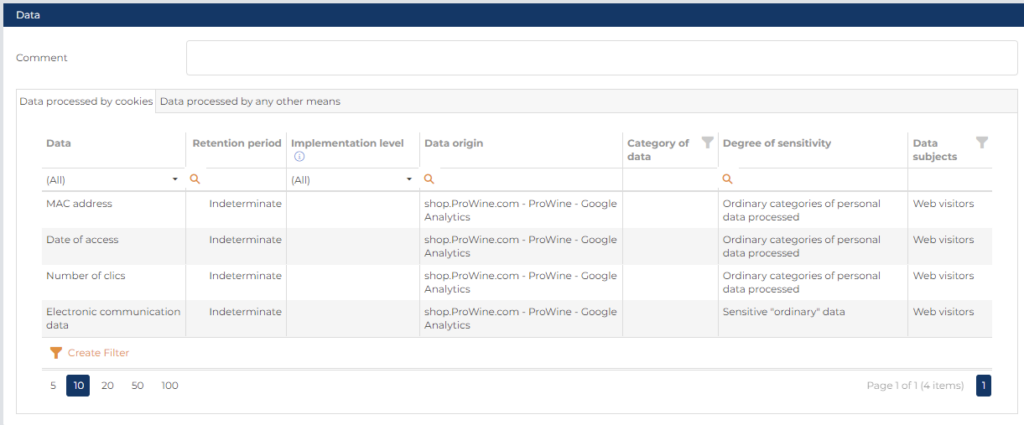
You just have to add the information related to:
- the retention period for erasure of the different categories of data and its implementation level (or indicate “Indeterminate” if you don’t know it)
- the category of personal data processed
- a comment if required
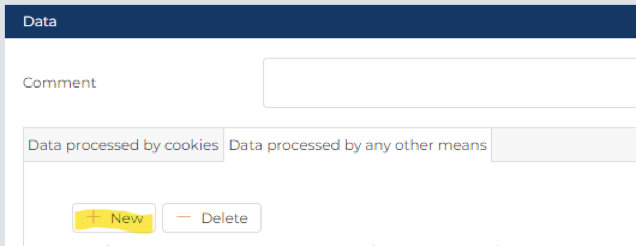
7.2.2.2.6.2 Data processed by other means
Please select “+ New” Tab first
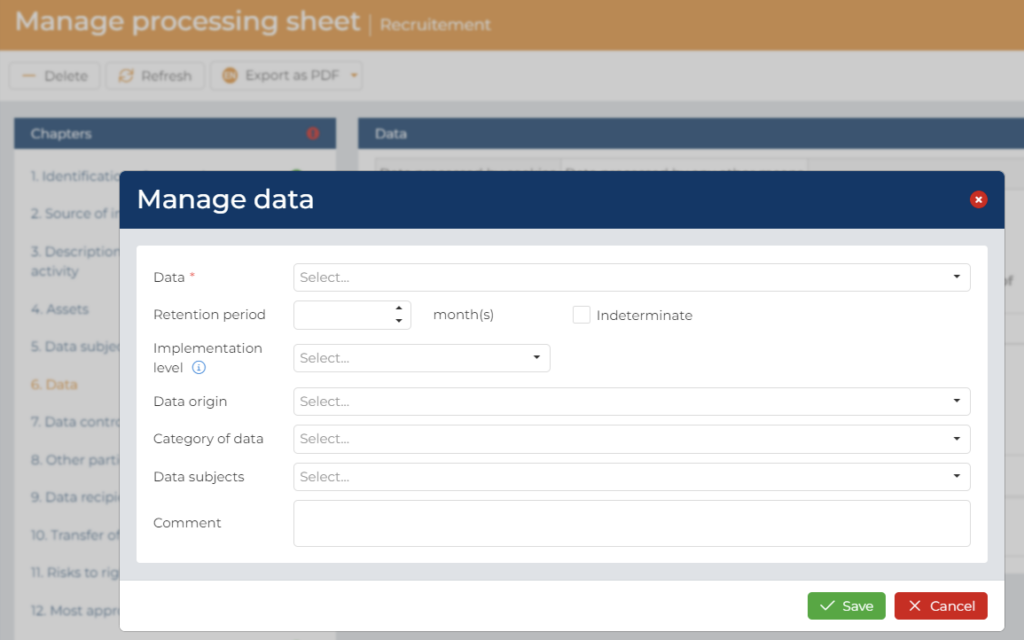
- Then select one Data from the dropdown list.
- Indicate the retention period for erasure of the different categories of data and its implementation level (or indicate “Indeterminate” if you don’t know it)
- Select the Origin of the Data from the dropdown list
- Select one Category of Personal Data from the dropdown list
- Select a specific Data Subject about whom the data is processed. The dropdown list is limited to the data subject indicated in the chapter 5 of the processing sheets.
- You can add a comment if you wish.
7.2.2.2.7 CHAPTER 7 – Data Controller
The purpose of this chapter is to document the data controllers and joint data controllers of the processing.
- Data controllers
The data controller are automatically encoded if the processing sheets have been created as part of the Record of a “Controller.” Then the entity choose during the creation of the processing sheet will be automatically shown and cannot be modified.
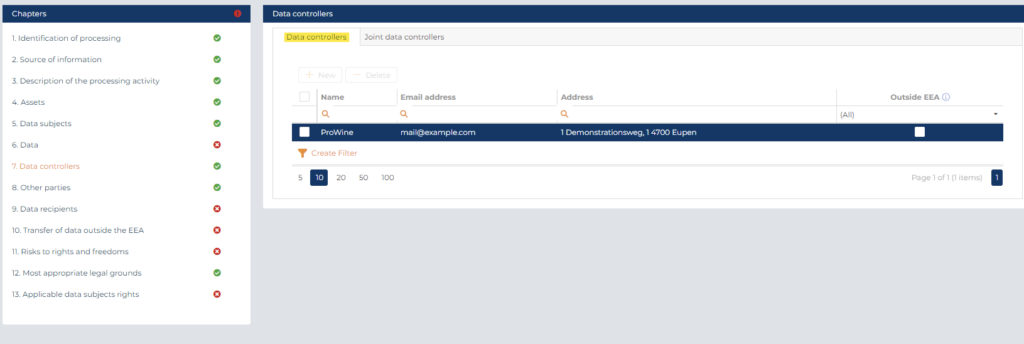
If your processing sheets is part of a Record of a “Processor”; “Data controller representative” or “Data processor representative”, you have to add a data controller by select the “Data Controllers” Tab first, then select the “+ New” Tab.
Then, you will be able to encode a new data controller:
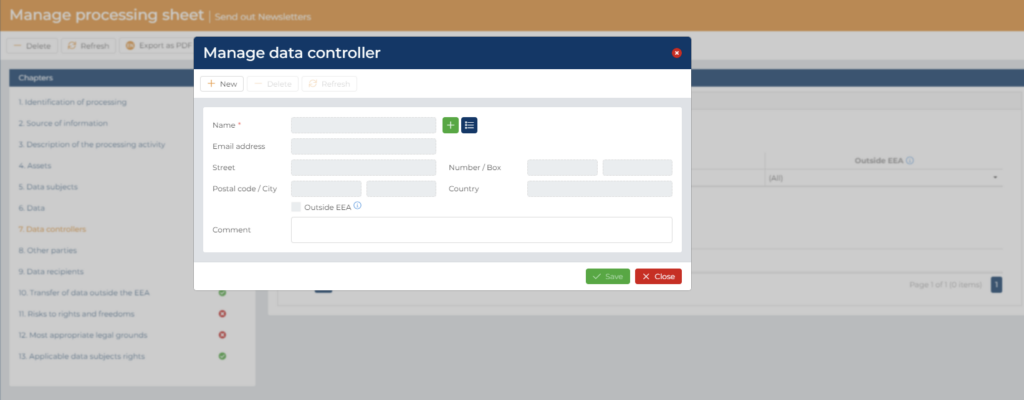
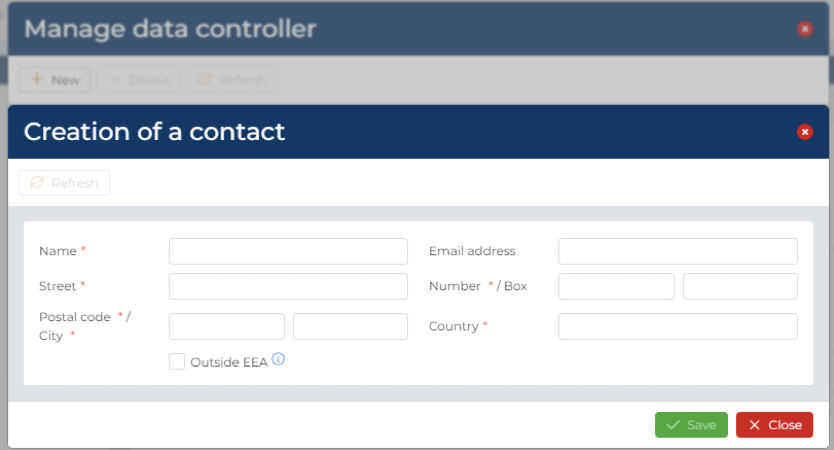
- via the “Create a new contact” tab or
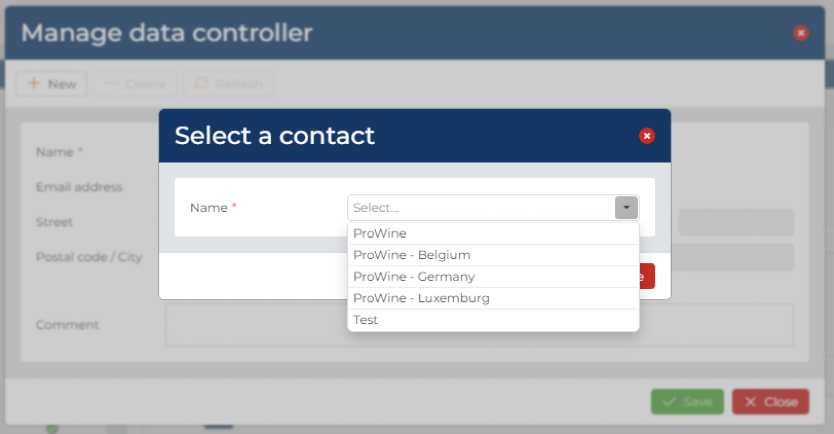
- to choose a data controller between your entities or other data controller already created before (via the “Choose an existing contact” tab).
7.2.2.2.7.2 Joint Data Controllers
If there are two or more controllers who jointly determine the purposes and means of processing, they shall be considered as joint controllers (art. 26 GDPR). If, for your processing activities, you are in this situation, please select the “Joint Data Controllers” Tab first, then select the “+ New” Tab.
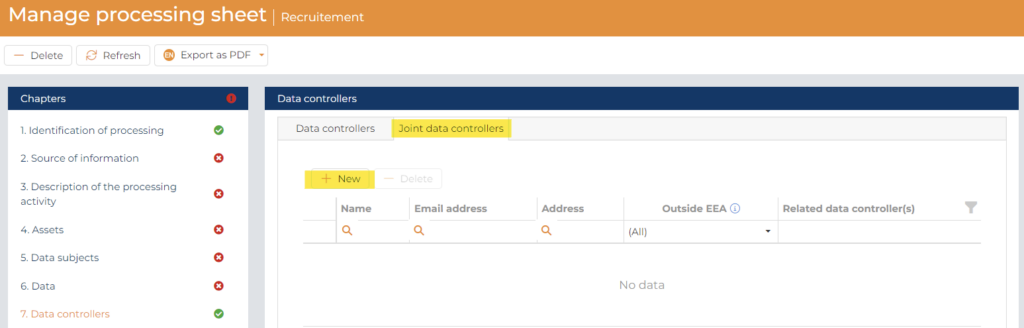
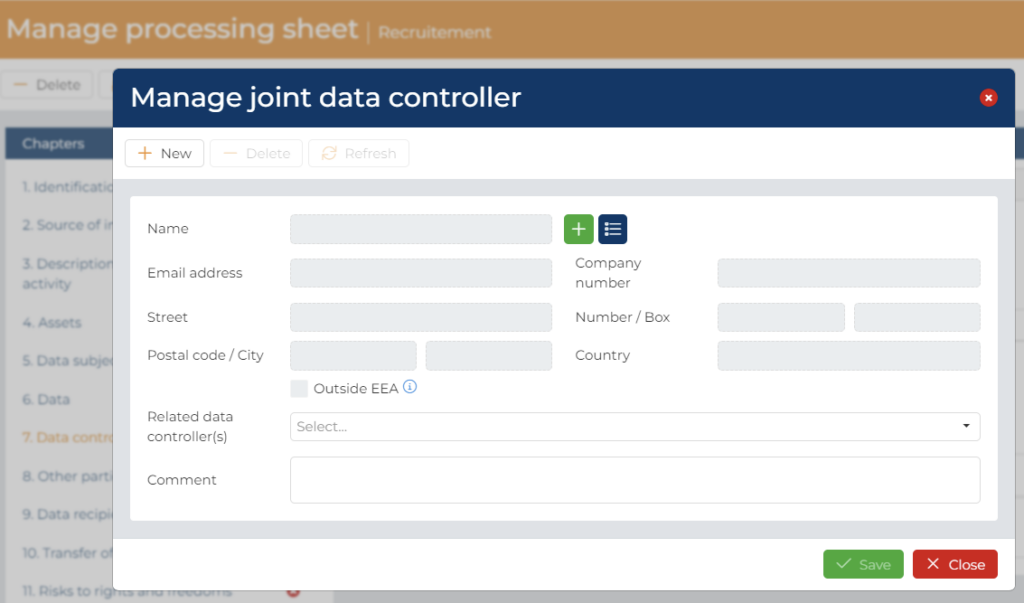
Then, you will be able to encode a new joint data controller:
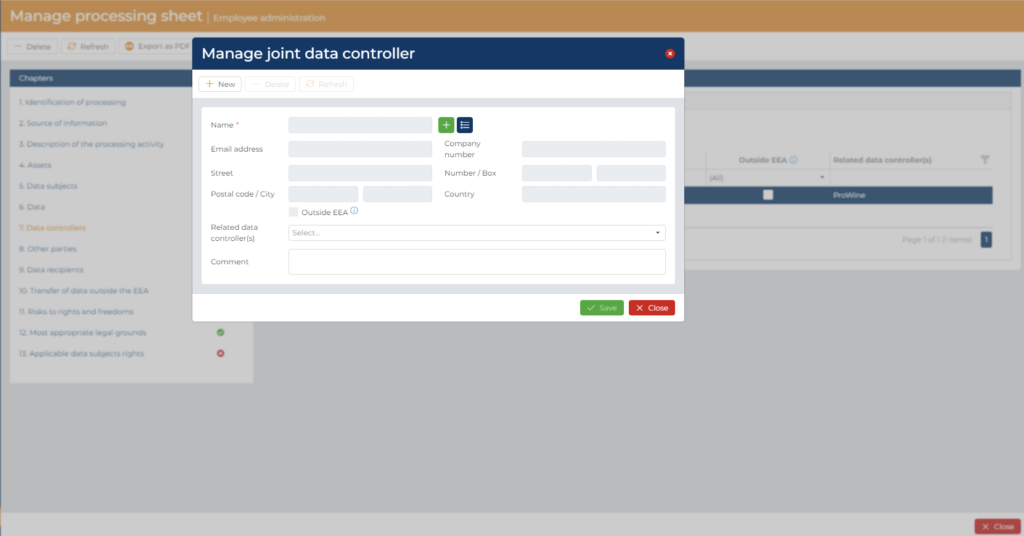
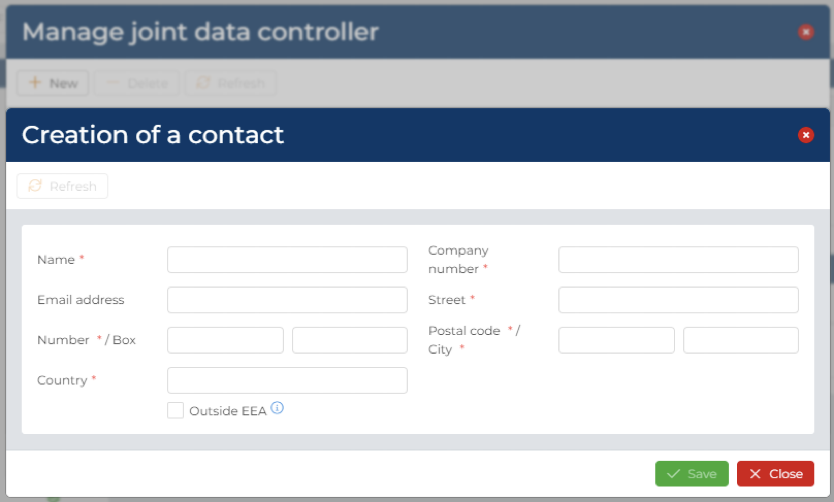
- via the “Create a new contact” tab or
- to choose a data controller between your entities or other data controller already created before (via the “Choose an existing contact” tab).
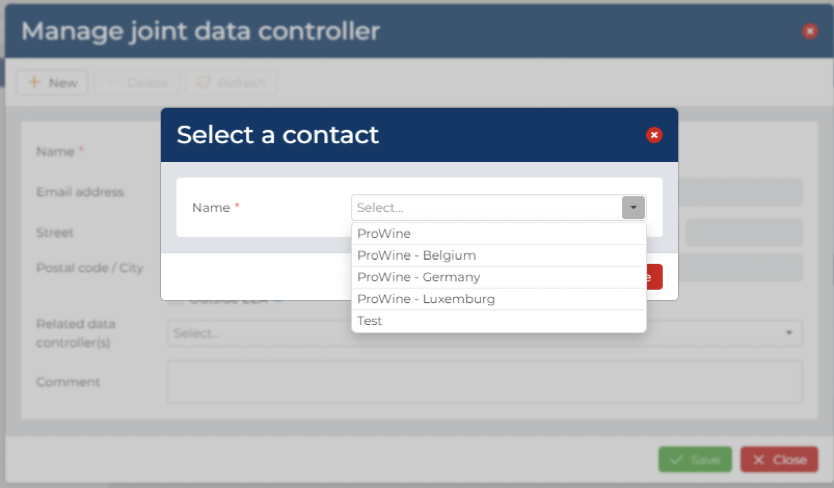
Then you just have to choose the data controller with whom the joint controller-ship is (you have the choice between the data controller present in the “data controller” tab).
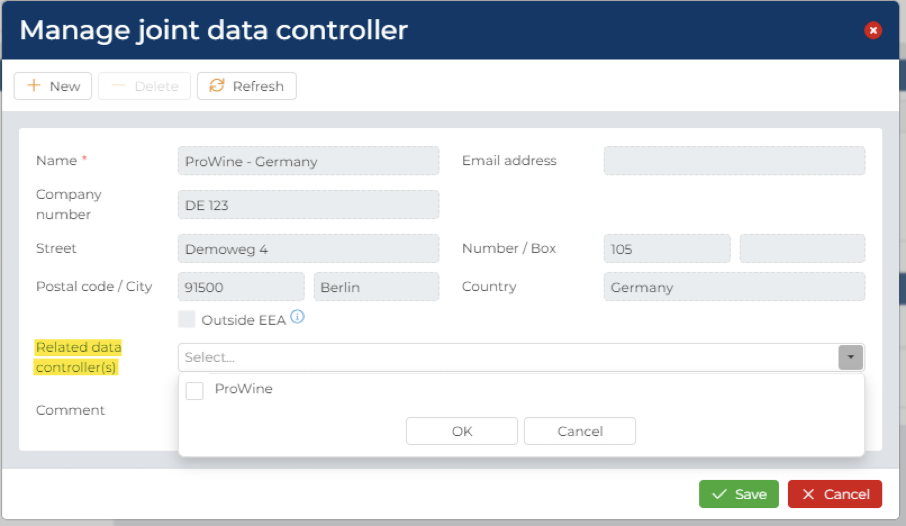
7.2.2.2.8 CHAPTER 8 – Other parties
The purpose of this chapter is to document the name and contact details of the DPO or the Controller/Processor’s representative in the Processing sheet as required by art. 30 GDPR.
The name and address of your own DPO if you have one and/or of the Controller/Processor’s representative, will be automatically display regarding the information provided during the set-up of your entities.
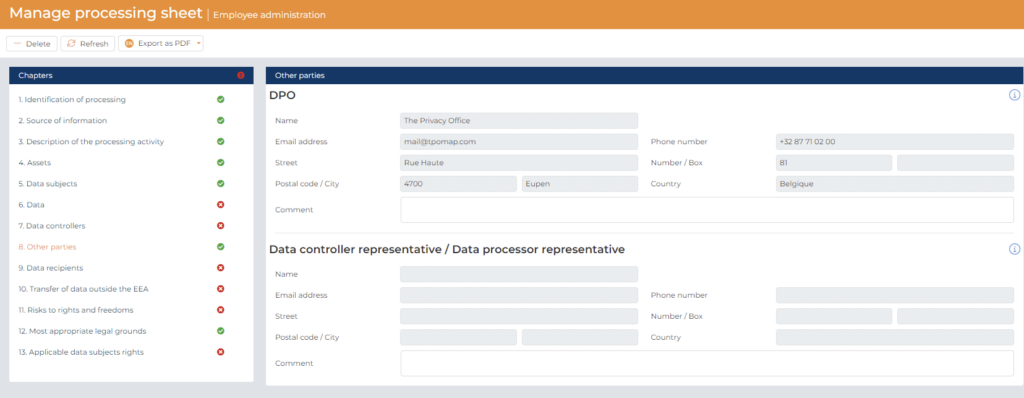
In case your organisation doesn’t have a DPO (as defined in art. 37 GDPR) or a Data controller representative (as defined in art. 27 GDPR), the cell will stay empty and color in grey (as indication of “impossible to write in it”).
7.2.2.2.9 CHAPTER 9 – Data recipients
The purpose of this chapter is to:
- Record the categories of recipients to whom personal data have been or will be disclosed as required by art. 30 GDPR and
- Record the name and contact details of the joint controllers as required by art. 30 GDPR and
- Identify the name and contact details of the data processors in order to support compliance with art. 28 GDPR and
- Identify the name and contact details of any third-party recipients in order to support the legitimacy of data transfers to third parties in compliance with art. 6 GDPR.
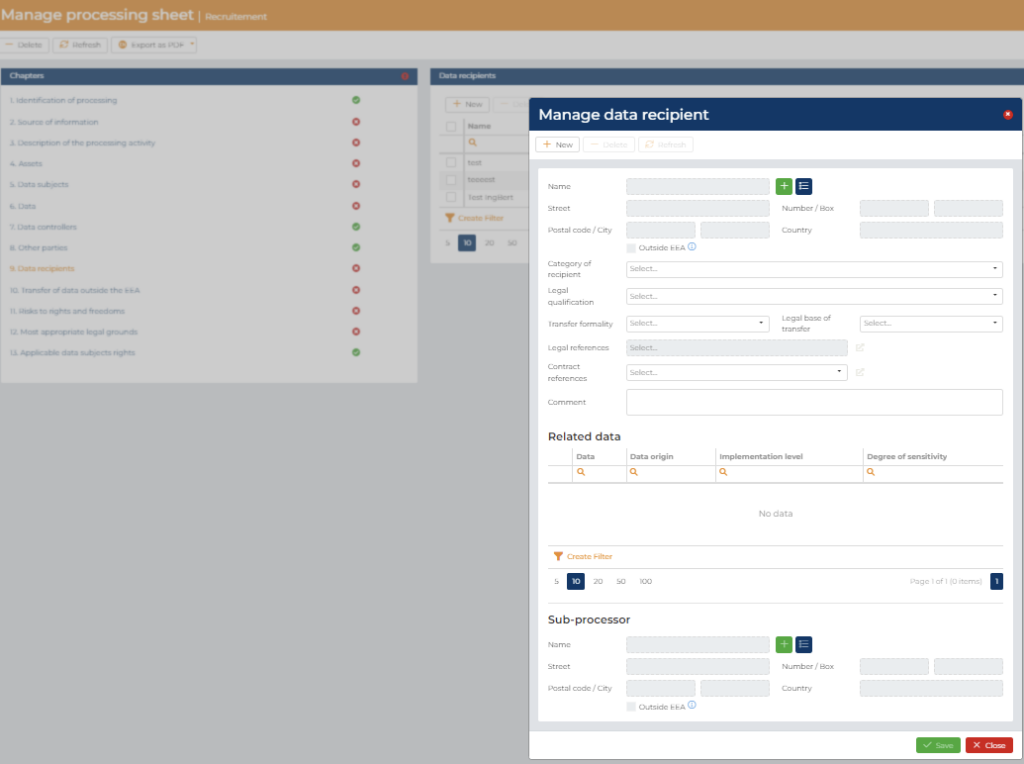
Please select the “+ New” Tab first. Then provide the name and contact details of all Data recipients of personal data and specify whether they are located outside of the EEA or not4. The focus should be placed on recipients outside of your organization. You have ton possibility to create a contact details of a data recipients:
- via the “Create a new contact” tab or
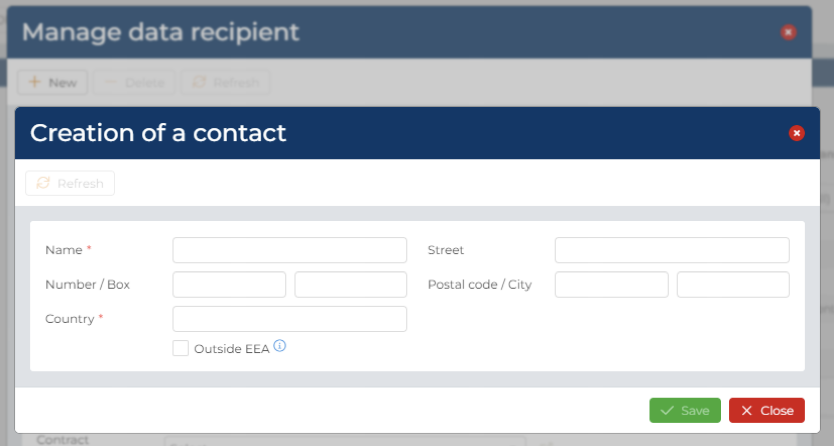
- to choose a data recipient between your potential recipients (created during the set-up process) or other data controller already created before (via the “Choose an existing contact” tab) or a data processor.
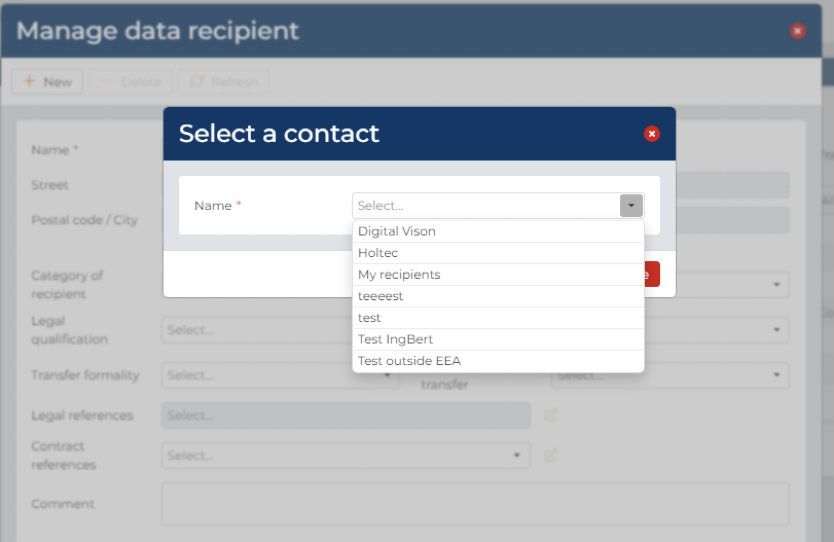
Afterwards, please complete the following information:
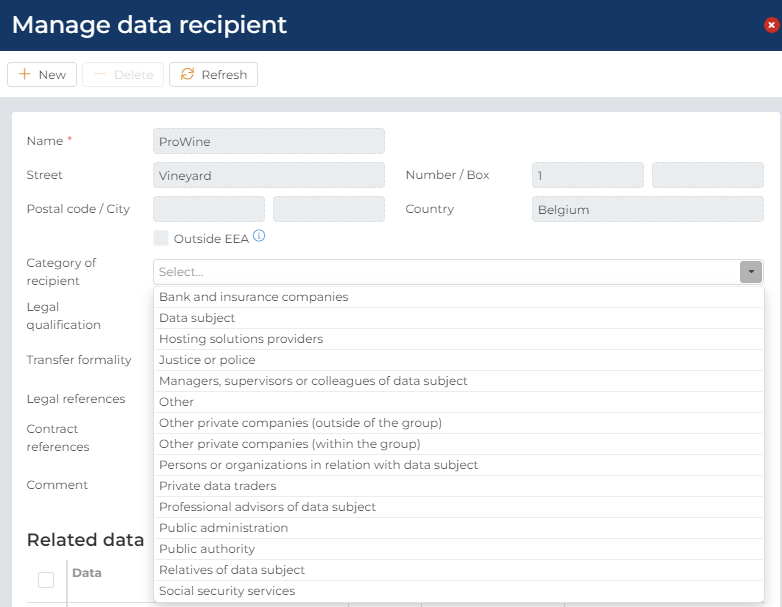
- The category of recipient: please select the category where your recipient belongs through our dropdown predefined list. This is important to have your privacy notice the more accurate possible as you have to list all you’re the category of recipient of personal data.
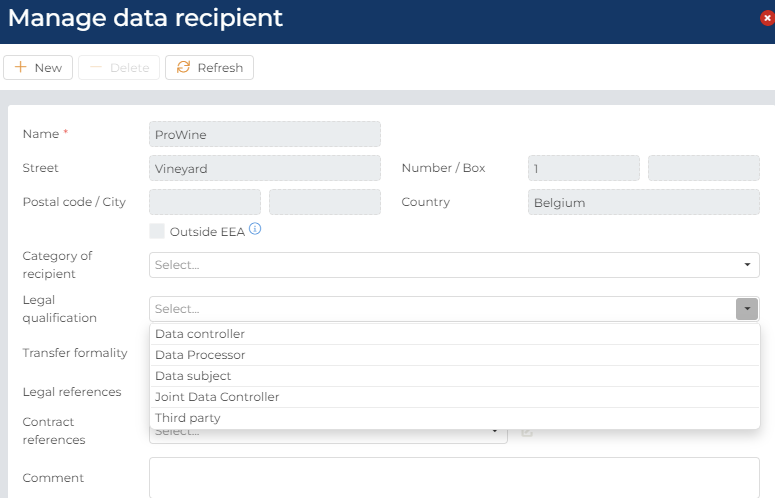
- The legal qualification of the data recipient from the dropdown list:
- Data controller (as defined in art. 4 (7) GDPR)
- Data processor (as defined in art. 4 (8) GDPR)
- Data subject (as defined in art. 4 (1) GDPR)
- Joint Data Controller (as defined in art. 26, 1. GDPR)
- Third Party (as defined in art. 4 (10) GDPR)
We recommend that you ask your DPO to validate this legal qualification.
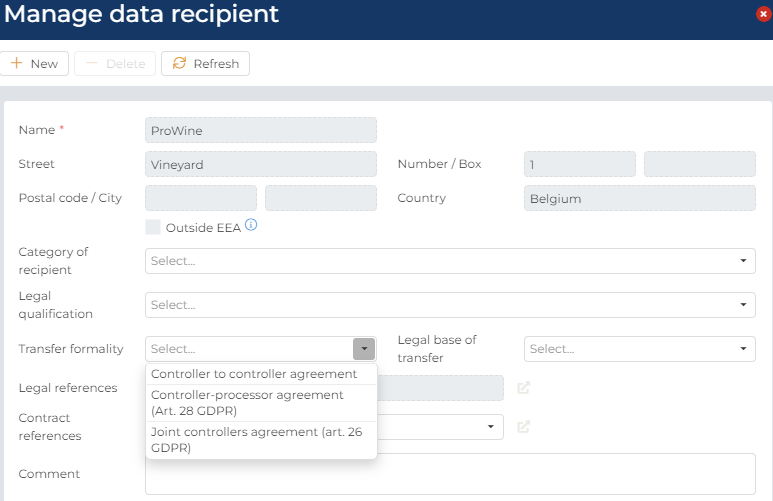
- The transfer formality: please select the element justifying the legitimacy of the data flow to the recipient from the dropdown list:
- Joint controllers’ agreement (art 26. GDPR)
- Controller-processor agreement (art. 28 GDPR)
- Controller to controller agreement
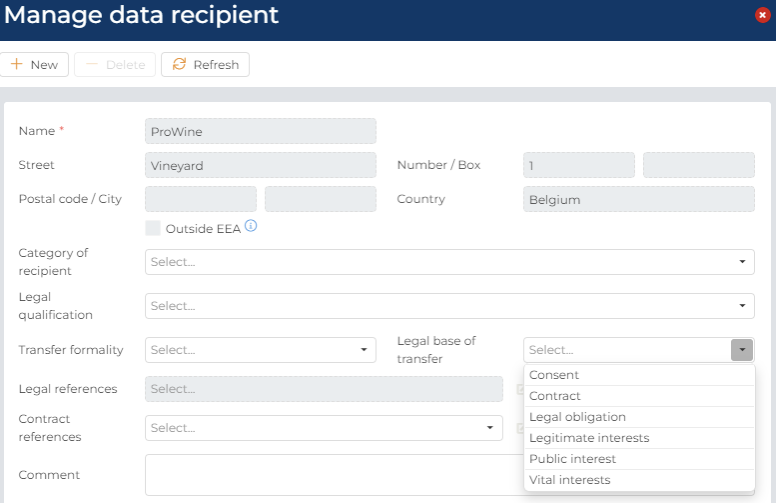
- The legal base of transfer: please select the legal bases justifying your transfer of data to the data recipients from the dropdown list:
- Legal obligation
- Consent
- Contract
- Legitimate interests
- Public interest
- Vital interests
We recommend that you ask your DPO to validate these elements.
- The legal references: if you have selected the legal base of transfer as “legal obligation”, you will then be able to link the law that legitimate the transfer after having stored it on the Documentation Center.
- The contract references: you are able to link the contract related to the transfer after having stored it on the Documentation Center.
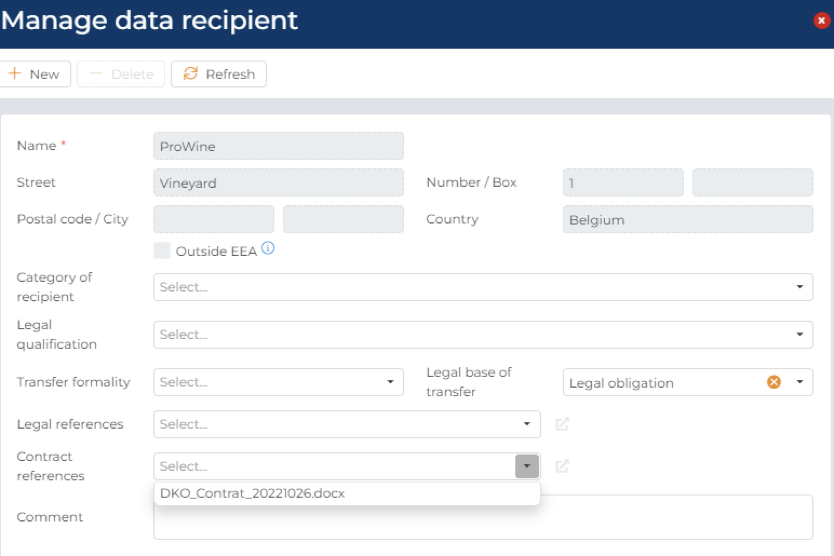
You will then be able to open directly the document stored on the Documentation Center by clicking on this button:

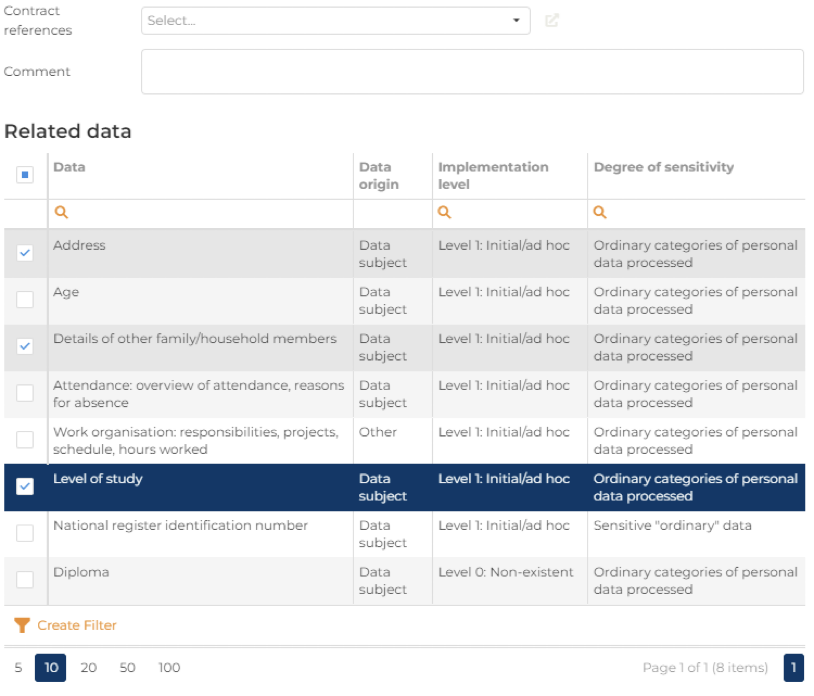
- Related data: you can click – between the personal data from chapter 6 – on the personal data that is specifically transferred to a data recipients (because all the personal data is not necessarily transferred to all data recipients)
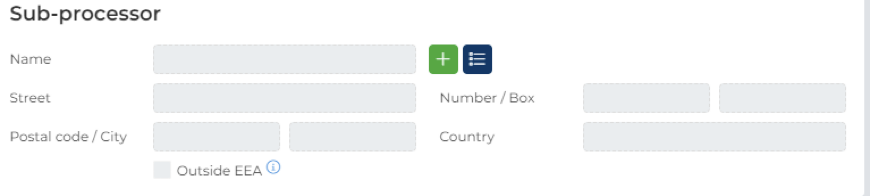
- Sub-processor: if you have choose “data processor” or “joint data controller” as the legal qualification of your data recipients, you have the possibility to link it to a sub-processor either by adding a new contact or use an existing contact (like for the recipients itself).
4 Please refer to the official website of the European Commission for the exact list of countries
https://ec.europa.eu/info/law/law-topic/data-protection/international-dimension-data-protection/adequacy-decisions_en
7.2.2.2.10 CHAPTER 10 – TRANSFER OF DATA OUTSIDE THE EEA
The purpose of this chapter is to comply with art. 30 GDPR by documenting whether, in case of a transfer of personal data outside the EEA (as identified in chapter 9):
- The recipient may rely on an adequacy decision of the European Commission pursuant to Article 45 (3) GDPR or
- The recipient benefits of appropriate safeguards pursuant to Article 46 GDPR such as:
- Approved certification mechanism
- Approved code of conduct
- Binding corporate rules
- Consent of the data subject
- Standard data protection clauses
- Other – please explain in the Comments section
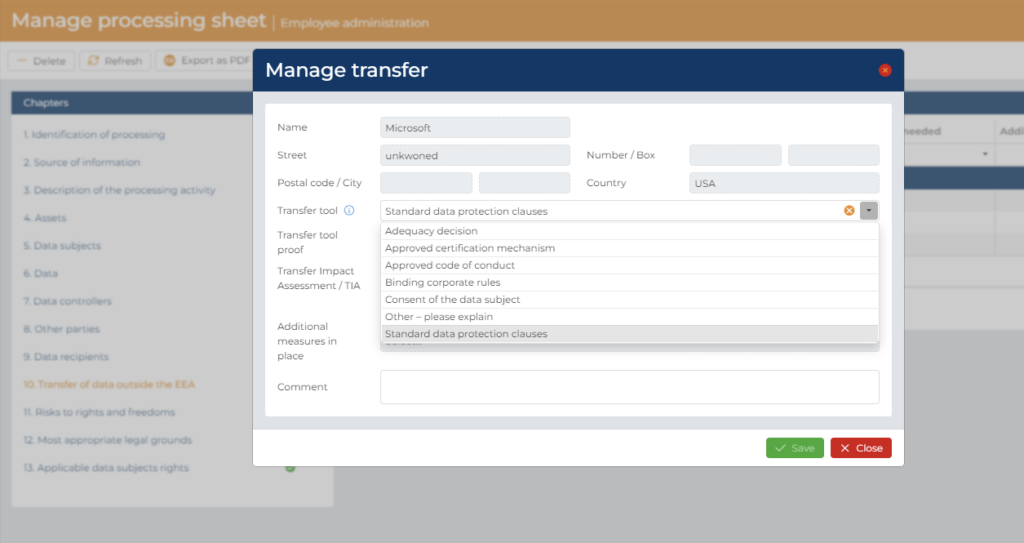
Please enter the following information for each transfer of data outside the EEA to Data Recipients in chapter 10:
- Please select the type of implemented appropriate transfer tool from the dropdown list. If no transfer tool is implemented, leave the cell blanc.
- On the “Transfer tool proof” section, you can select the document related to the transfer tool (i.e. the contract with Microsoft where the standard data protection clauses are included) that you have saved on the Documentation Center (in the folder “03 – Compliance Evidence ; 05 – DPA’s)
- On the “Transfert Impact Assessment/TIA” section, you can select the TIA’s document5 that you have saved on the Documentation Center (in the folder “03 – Compliance Evidence ; 08 – TIA’s)
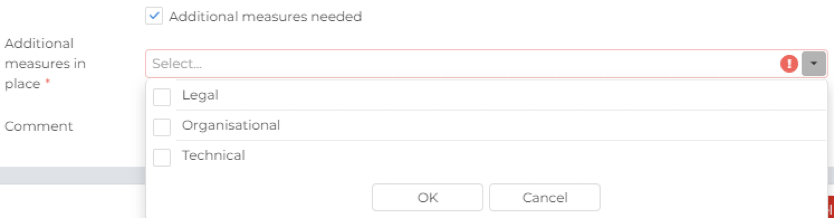
- If the TIA performed demonstrate that additional measures must be put in place, please tick the box next to “additional measures needed” et select in the dropdown menu of the “additional measures in place”, the type of measures put in place (legal, organisational or technical).
- You have a cell “Comment”, to put there any information you want about the recipient.
The Name and Address of the personal data recipient are automatically fill-in on the basis of the information available on Chapter 9.
We recommend that you ask your DPO to validate these elements.
5 Realised in accordance with the Recommendations 01/2020 on measures that supplement transfer tools to ensure compliance with the EU level of protection of personal data, Version 2.0, Adopted on 18 June 2021 by the EDPB.
7.2.2.2.11 CHAPTER 11 – Risks to rights and freedoms
This chapter is used to ensure and document compliance with art. 35 GDPR by:
- Documenting whether a personal data processing activity “is likely to result in a high risk to the rights and freedoms of natural persons” by selecting whether the official criteria of the relevant data protection authorities6 are met or not and
- Assessing whether a Data Protection Impact Assessment (DPIA) prior to this processing is thus “normally required”, “normally not required” or “not legally required”. Such assessment will be automatically calculated on the basis of the criteria selected.
- Logging, whether a DPIA has been performed by selecting yes or no next to the cell “DPIA Done”.
- Documenting any related comments or link to related documents (which should ideally be stored in the TPOmap Documentation Depository).
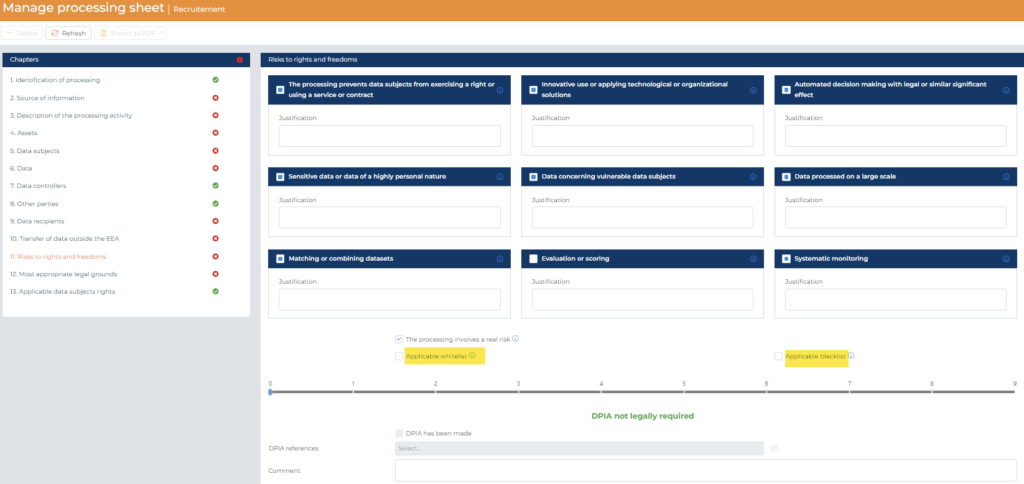
- Select (X)one or several of the 9 Legal Risks to rights and freedoms criteria (criteria established by the European Data Protection Board) applicable to this processing. You have, next to each criteria, a tool type with all the official explanations of the criteria.
Two criteria are automatically fill-in based on the information filled-in in the previous chapter:
- “Sensitive data or data of a highly personal nature” is automatically selected if in the Chapter 6 – Data, you have encoded some Personal Data with a degree of sensitivity egal to “Sensitive “ordinary data” ; “Special categories of personal data processed” or “”Data relating to litigation”
- “Data concerning vulnerable data subjects” is automatically selected if in the Chapter 5 – Data subjects, you have encoded some “Related vulnerable data subject”
You have the possibility to insert a “Justification” next to each criteria to justify why you have tick (or not) the criteria. It can be useful to indicate it to remember after some times, why you have tick (or not the criteria).
- Regarding the “Processing involves a real risk” tab, it’s selected (X) automatically but you are free to say that the processing does not involves a real risk (i.e. from what you know, you have put in place all the security measures possible and there is no real risk regarding an illegitimate access, modifications or deletion of the data) and therefore than none DPIA should be carrying out.
- Select (X) if any Applicable whitelist which has been determined by your processing entity competent supervisory authority applies for this processing (in the tooltip, you will find the link to the list of the Belgium and Luxembourg authority).
- Select (X) if any Applicable blacklist which has been determined by your processing entity competent supervisory authority applies for this processing (in the tooltip, you will find the link to the list of the Belgium and Luxembourg authority).
This chapter of the Processing sheet allows to record information about the risk level of a processing and determine if a Data Protection Impact Assessment (“DPIA”) will be required for this processing or not.
After entering the above-mentioned information:
- The processing sheet will then automatically calculate a risk level for this processing and display:
- DPIA not legally required (in green) for a Low risk level (0 criteria fulfilled or whitelist applicable)

- DPIA normally not legally required (in yellow) for a Medium risk level (only one criteria fulfilled)

- DPIA normally required (in red) for a High risk level (min. 2 criteria fulfilled or blacklist applicable)

- DPIA not deemed necessary (in green) for a High risk level (if the processing does not involves a real risk)

- If the processing is deemed to be of High risk level and thus a DPIA is normally required, a new cell will be available: DPIA has been made.
Please Select (X) depending on if the DPIA normally required has been already made or still need to be made.
You can also select the document related to the DPIA’s report that you have saved on the Documentation Center (in the folder “03 – Compliance Evidence ; 02 – DPIA’s)
6 Regarding the criteria set by the Article 29 Data Protection Working Party, “Guidelines od Data Protection Impact Assessment (DPIA) and determining whether processing is “likely to result in a high risk” for the purposes of Regulation 2016/679, adopted on 4 October 2017.
7.2.2.2.12 CHAPTER 12 – Most appropriated Legal Grounds
This chapter of the Processing sheet allows to record information about the most appropriate Legal Grounds of your processing and its implementation status. The completion of this chapter will thus help you to justify why the processing is legitimate.
To fill-in this chapter, please enter the following information:
- For the ordinary personal data
- Please select the “+ New” Tab first.

- Then select the processing Legal base (referring to GDPR Art. 6) involved in the personal data processing activity and the implementation status by choosing from the dropdown list.
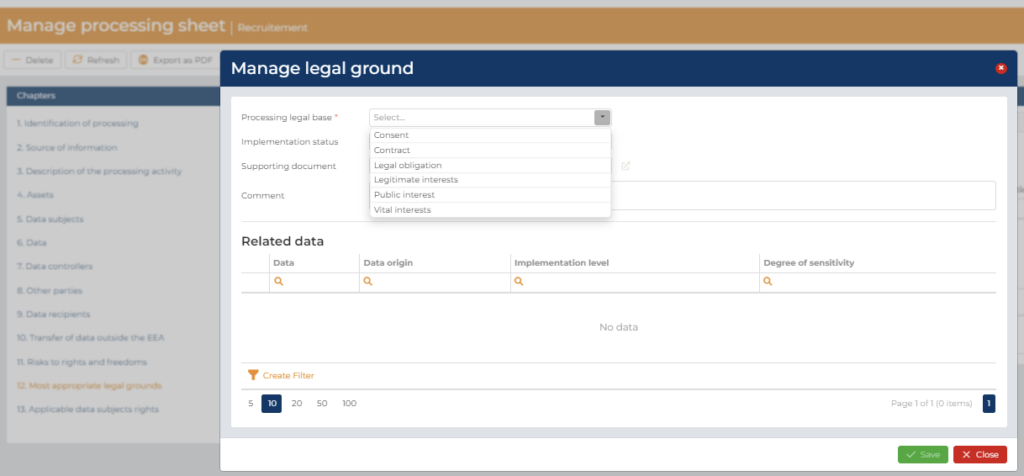
- Then you can make a link to the supporting document regarding your legal bases (i.e. the applicable law or contracts, a screenshot of the consent forms or the analysis of the legitimate interests) that you have saved on the Documentation Center (in the folder “03 – Compliance Evidence ; 03 – Legal bases of processing)
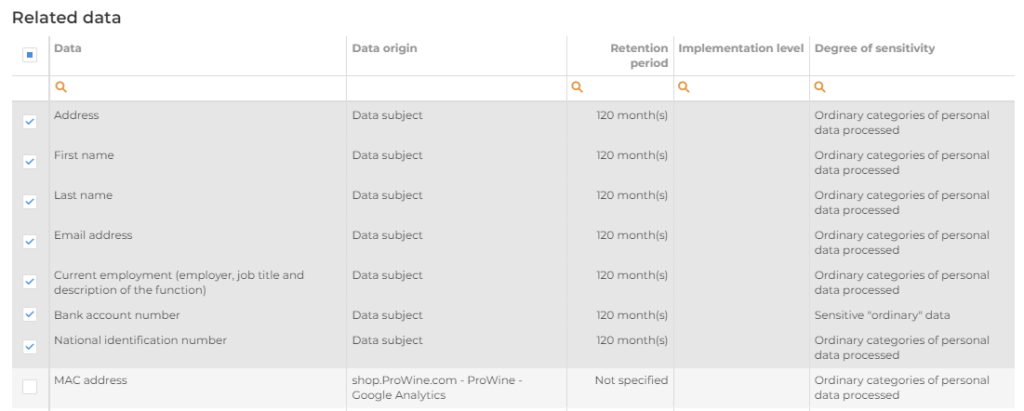
- Finally, you have to select the personal data that is concerned by the legal bases you have selected as you might have several legal bases for the processing of personal data for a give purpose (i.e. you might have personal data of your employees via their contract and some other personal data that you must process according to the law)
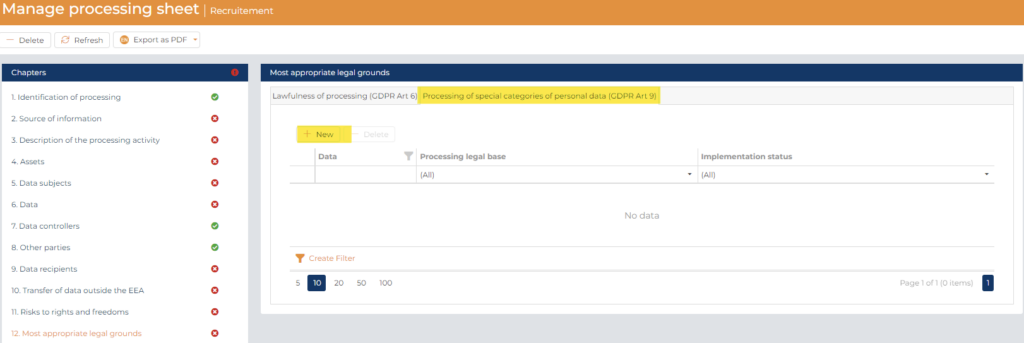
- For the special categories of personal data from GDPR Art. 9
- Please select the “+ New” Tab first.
- Then select the processing Legal base (referring to GDPR Art. 9) involved in the personal data processing activity and the implementation status by choosing from the dropdown list.
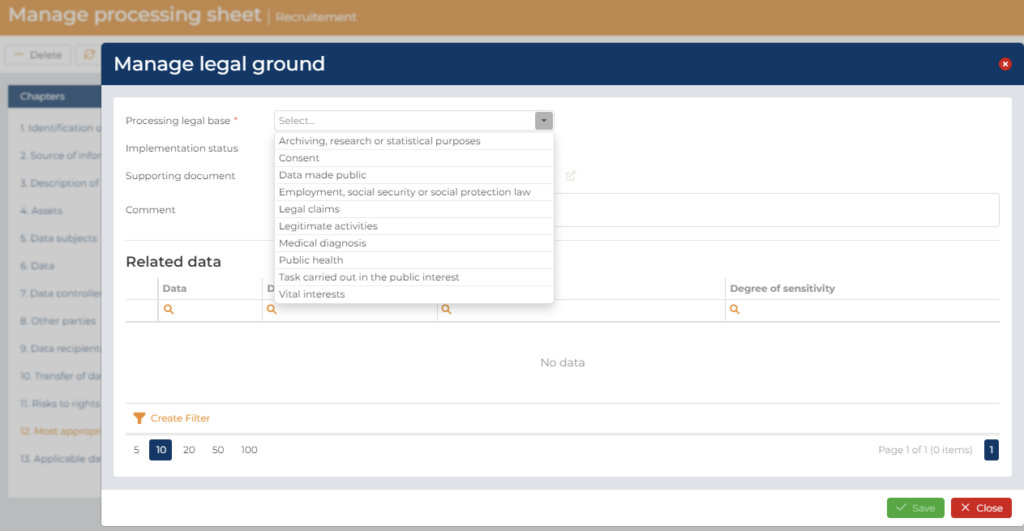
- Then you can make a link to the supporting document regarding your legal bases (i.e. the applicable law or contracts, a screenshot of the consent forms or the analysis of the legitimate interests) that you have saved on the Documentation Center (in the folder “03 – Compliance Evidence ; 03 – Legal bases of processing)
- Finally, you have to select the personal data that is concerned by the legal bases you have selected as you might have several legal bases for the processing of personal data for a give purpose (i.e. you might have personal data of your employees via their contract and some other personal data that you must process according to the law)

7.2.2.2.13 CHAPTER 13 – Applicable Data subject rights
This chapter of the Processing sheet allows you to record information about the applicable rights for the data subject of the processing concerned. These rights will depend on the most appropriate legal grounds selected in chapter 12.
First, you have the “Right to transparency” tab which show for each data subjects selected in the “Chapter 5 – Data subjects” if a Privacy notice relating to the processing has been drafted for them or not.
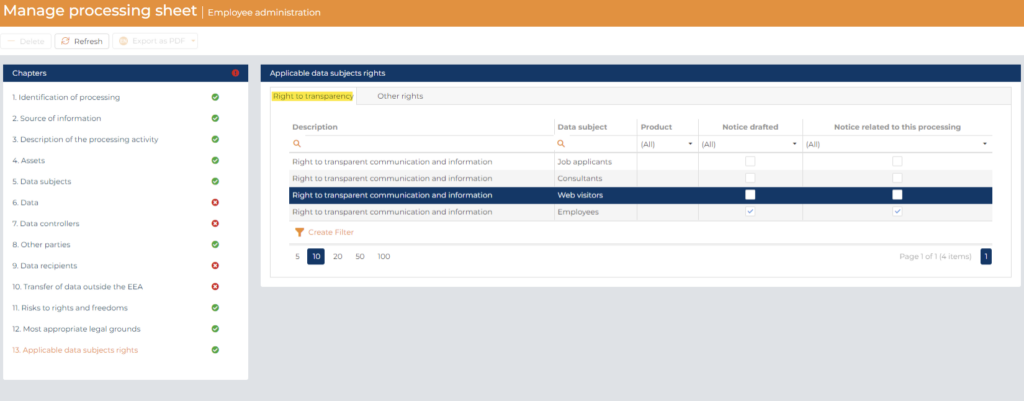
- Select (X) if the Privacy notice has been drafted and if it is related to this processing
You can also make a link with the Product where the drafted Privacy notice has been made available for the data subjects.
Then you have the “Other rights” tab where the applicable data subject rights are automatically selected according the legal grounds selected in chapter 12.
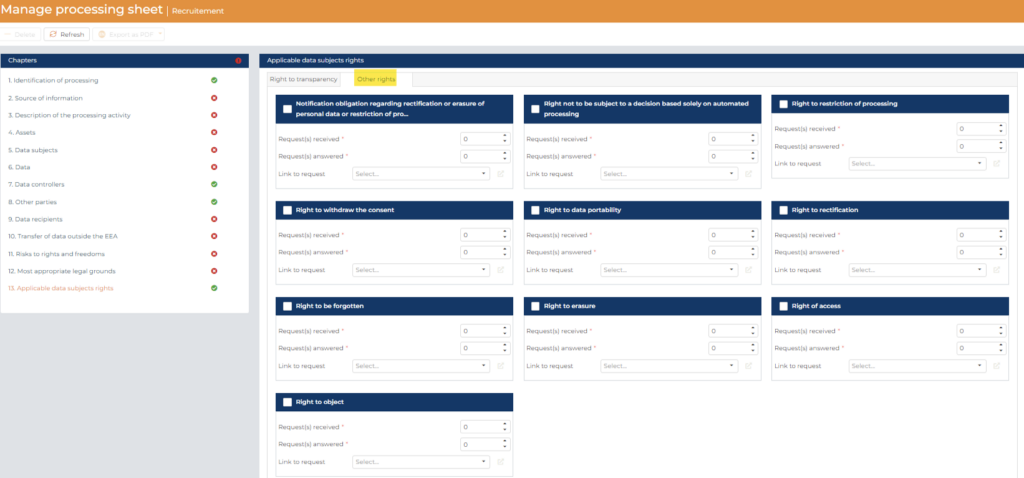
For all kinds of data subject rights:
- Record the number of data subject Requests received
- Record the number of Requests answered
- Record a link to the request and answers that you have saved on the Documentation Center (in the folder “03 – Compliance Evidence ; 10 – Data subject rights)
7.2.3 Validate Processing sheets
As suggested in Section 2.4.1. of this User Guide, Records of processing activities should be reviewed with an organization’s Data Protection Officer or Data Protection Manager at a frequency stipulated in the organization’s Privacy Management Policy but at least once per year.
7.2.4 Archive Processing sheets
If you desire, for example when you review once per year your processing sheets, to have a view of before/after the review of the processing sheets, please :
- Duplicate the processing sheets in question
- Please, for the “old” processing sheets indicate in chapter 1, “Archived” as of “Status of processing”

Then, on the dashboard, you will have the possibility to view the situation regarding the “archived” processing sheets and the other processing sheets.